By Noman Arshad

Join Pak Army exam slip download requires entering your CNIC (with dashes) on joinpakarmy.gov.pk. Officer candidates (LCC/TCC/DSSC) get their slip immediately after registration, while Soldier candidates receive theirs later, tied to a specific batch schedule. The slip contains your roll number, test date, and center.
Most guides tell you to “enter your CNIC and download the slip” as if it’s the same experience for everyone, when it genuinely isn’t. I’ve worked in HR for five years, and one pattern I see constantly is people assuming a process works the same way for every category of applicant, then getting confused when it doesn’t. Officer candidates and Soldier candidates get their slips on completely different timelines, and this guide walks through both, plus what to do if your slip simply isn’t showing up — a real problem candidates report but that most pages never address. I’ve seen this exact confusion come up again and again when people compare notes on how long things “should” take. If you haven’t registered yet, our Join Pak Army Online Registration 2026 guide covers that first step.
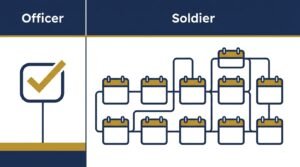
Two Different Timelines: Officer vs. Soldier Candidates
This is the single most important thing to understand before you go looking for your slip.
Candidate Type: Officer (LCC, TCC, DSSC) — When the Slip Is Available: Generated immediately after submitting the online registration form
Candidate Type: Soldier (Sipahi) — When the Slip Is Available: Issued later, tied to a specific batch schedule (e.g., “Soldier 2026-A batch”)
Candidate Type: AFNS (Nursing) — When the Slip Is Available: Issued on a specific declared date for that batch (one example: declared 5 August 2026 for that cycle)
What this means practically: If you’re an officer candidate and your slip isn’t appearing right after registration, something may genuinely be wrong with your submission. If you’re a Soldier candidate, on the other hand, a delay of days or even weeks might simply mean your batch’s slips haven’t been issued yet — that’s normal, not necessarily an error.
Q: Why is my Pak Army exam slip not showing up immediately?
This depends entirely on which category you registered under. Officer candidates (LCC, TCC, DSSC) should see their slip generated immediately after submitting the online form, so a missing slip in that case may indicate a submission issue worth checking. Soldier candidates, however, receive their slips on a batch schedule tied to a specific recruitment cycle, meaning a delay of days or weeks after registration is often completely normal rather than a sign of a problem.
Step-by-Step: How to Download Your Slip
- Visit the official portal — joinpakarmy.gov.pk, avoid any third-party site claiming to offer slip downloads.
- Enter your CNIC with dashes — the correct format is XXXXX-XXXXXXX-X (e.g., 61101-1234524-1). Entering it without dashes is a common reason the system doesn’t return a result.
- Click Search/Submit — the portal will pull up your registration record if it’s been processed.
- Check that your slip has been issued — for officer candidates this should appear right away; for soldier candidates, this depends on your batch’s schedule.
- Download and print the slip — bring the physical printed copy, not just a screenshot on your phone, since recruitment centers typically require the printed version for entry.
If you want to plan your travel before your slip even arrives, the official portal maintains a full list of Army Selection Centers with contact details and addresses — worth checking in advance if your test center might be outside your home city.
Worked Example — Soldier Candidate Checking Slip Status
Suppose a candidate registered for the Soldier (Sipahi) 2026-A batch before the registration deadline and is now checking for their slip two weeks later.
- He visits joinpakarmy.gov.pk and enters his CNIC with dashes in the correct format.
- The system shows his registration was received, but no slip has been issued yet.
- Rather than assuming something is wrong, he checks whether his specific batch’s slip issuance date has been announced yet — since Soldier batches are issued on a schedule, not instantly.
- He continues checking every few days rather than repeatedly resubmitting his CNIC or assuming an error, since resubmission doesn’t speed up batch-based issuance.
- When his batch’s slips are released, his slip appears with his roll number, test date, and center.
A quick timeline note: If registration closed on 21 December and test dates for that batch were scheduled for January, that’s roughly a 3-4 week gap between registration deadline and slip issuance for Soldier candidates — a useful reference point for how long a “normal” wait can reasonably be, versus officer candidates whose slips appear within minutes of submission.
Why this matters: The difference between “something is wrong” and “this just hasn’t been issued yet” comes down entirely to knowing which candidate category you’re in — treating every delay as an error leads to unnecessary panic or repeated attempts that don’t actually help.
What to Check on Your Slip Once You Have It
Don’t just download and print without reviewing it. Verify:
- Your name and CNIC number match exactly what you submitted
- Roll number is present and legible
- Test date and reporting time — note these down separately in case the printed copy is damaged or lost
- Test center location — confirm you know exactly where this is, especially if it’s not your home city
Q: What should I do if there’s an error on my Pak Army exam slip?
If you notice a mistake in your personal details, roll number, or any other information on the slip, you should contact your nearest Army Selection and Recruitment Center (AS&RC) immediately rather than waiting until test day. Errors caught early can usually be corrected before they cause a problem at the recruitment center, while errors discovered on the day of the test itself can create unnecessary complications during entry. The official portal also has a dedicated exam feedback page for reporting issues.
Q: What documents should I bring along with my exam slip on test day?
Beyond the printed slip itself, candidates should bring their original CNIC or B-Form, since recruitment centers typically cross-check your identity document against the slip before allowing entry. It’s also worth bringing a spare pen and a few passport-size photographs, since some stages of testing or documentation on the day itself may ask for these — something I always suggest preparing for in advance, even though it isn’t strictly part of the slip download process itself.
What to Do If Your Slip Isn’t Showing At All
This is the scenario most guides skip entirely, even though it’s a real problem candidates report — and in my experience, panic at this stage usually makes things worse, not better. If you’ve entered your CNIC correctly and still see no slip:
- Confirm your candidate category and expected timeline — if you’re a Soldier candidate, check whether your batch’s slip issuance date has actually arrived yet, using the two-timeline distinction above.
- Double-check your CNIC format — missing dashes or a typo is one of the most common reasons the system returns nothing.
- Use the official exam feedback channel — joinpakarmy.gov.pk/examfeedback/, hosted directly under Pakistan Army General Headquarters (GHQ) Rawalpindi, is the appropriate channel for reporting a genuinely missing slip rather than third-party forums or social media.
- Avoid repeatedly resubmitting — if your batch’s slips simply haven’t been issued yet, resubmitting your CNIC won’t change anything and may just waste your time.
Q: My Pak Army exam slip has been pending for over a week — what should I do?
First, confirm which candidate category you’re in, since Soldier candidates are issued slips on a batch schedule that can reasonably take time, while Officer candidates should see theirs immediately. If you’re confident your registration was submitted correctly and enough time has passed relative to your batch’s expected schedule, the official exam feedback page at joinpakarmy.gov.pk/examfeedback/ is the appropriate channel to raise the issue directly with GHQ Rawalpindi, rather than relying on unofficial forums or repeated resubmission attempts.
Recruitment Programs Covered by This Slip System
The same CNIC-based download system applies across multiple Pakistan Army recruitment streams, but as this table shows, the issuance pattern splits cleanly along officer-track versus soldier/nursing-track lines:
Program: Soldier (Sipahi) — Issuance Type: Batch-based
Program: PMA Long Course — Issuance Type: Immediate
Program: DSSC (Direct Short Service Commission) — Issuance Type: Immediate
Program: Lady Cadet Course (LCC) — Issuance Type: Immediate
Program: Technical Cadet Course (TCC) — Issuance Type: Immediate
Program: Armed Forces Nursing Service (AFNS) — Issuance Type: Batch-based
Worth remembering regardless of which specific program you’ve applied to.
Q: Does the same slip download process work for all Pakistan Army recruitment programs?
Yes, the CNIC-based download system on joinpakarmy.gov.pk works the same way across Soldier, PMA Long Course, DSSC, Lady Cadet Course, Technical Cadet Course, and AFNS applications. What differs between programs isn’t the download method itself, but the timing — officer-track courses like PMA, DSSC, LCC, and TCC issue slips immediately, while Soldier and AFNS applications follow a batch-based schedule instead.
The Short Version
Join Pak Army exam slip download requires entering your CNIC with dashes on joinpakarmy.gov.pk. Officer candidates (LCC, TCC, DSSC) get their slip immediately after registration; Soldier and AFNS candidates receive theirs later, tied to a specific batch schedule — so a delay for these categories is often normal, not an error. The slip contains your roll number, test date, and center, and should be checked carefully before test day. If a slip is genuinely missing beyond the expected timeline, the official exam feedback page at joinpakarmy.gov.pk/examfeedback/ is the right channel to raise it.
FAQs
How do I download my Pak Army exam slip?
Visit joinpakarmy.gov.pk, enter your CNIC with dashes (e.g., 61101-1234524-1), and click Search. If your slip has been issued, it will appear for download and printing.
Why is my Pak Army exam slip not showing up immediately?
It depends on your candidate category. Officer candidates (LCC, TCC, DSSC) should see it immediately. Soldier and AFNS candidates receive theirs on a batch schedule, so a delay is often normal rather than an error.
What should I do if there’s an error on my Pak Army exam slip?
Contact your nearest Army Selection and Recruitment Center (AS&RC) immediately, or use the official exam feedback page, rather than waiting until test day to address it.
My Pak Army exam slip has been pending for over a week, what should I do?
Confirm your candidate category and expected batch timeline first. If enough time has passed and it’s still missing, use the official exam feedback page at joinpakarmy.gov.pk/examfeedback/ to raise the issue directly.
Which Pakistan Army recruitment programs use this same slip download system?
Soldier (Sipahi), PMA Long Course, DSSC, Lady Cadet Course (LCC), Technical Cadet Course (TCC), and Armed Forces Nursing Service (AFNS) all use the same CNIC-based download system on joinpakarmy.gov.pk.
What details should I check on my exam slip before test day?
Verify your name, CNIC number, roll number, test date, reporting time, and test center location all match your submitted information and are clearly legible.


One Comment on “Pak Army Exam & Registration Slip Download Guide 2026”